
Desk: a one-page daily dashboard you can build with Claude
Published:
Desk is the page I keep open all day. It reads my Google Calendar and Gmail, turns the calendar into a checklist for today, and keeps a short list of goals that have no date. I built it by talking to Claude, and it lives as a private Claude artifact.
There is no link to my copy, because a desk is personal: mine is set to my time zone, my language and my own tagging habits. What I can share is the recipe, so you can have Claude build yours.
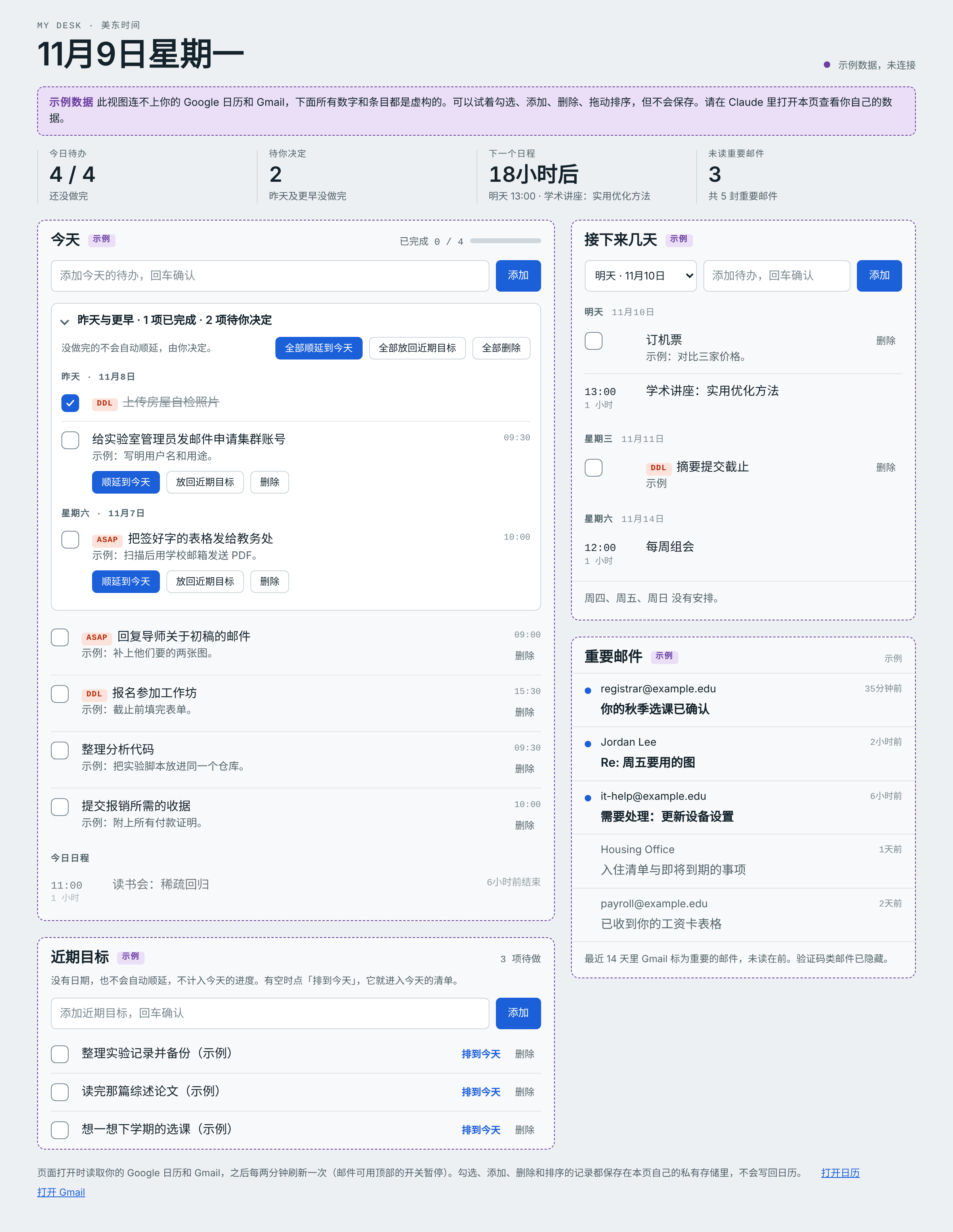
The page with its built-in sample data (everything in this picture is invented). My copy is in Chinese; yours can be in any language.
The ideas worth copying
The calendar is the to-do list. I already put small tasks into Google Calendar as 30-minute events, often with a tag in front such as 【ASAP】 or 【DDL】. Desk treats a plain event that has a tag or a description as a to-do with a checkbox. Anything with other attendees, a location, a meeting link or a repeat rule stays a normal event. One click moves an item from one group to the other, and the page remembers the choice for that whole event series.
Nothing rolls over on its own. Unfinished items from yesterday do not move silently into today. They wait in a “yours to decide” block at the top, and for each one I pick: carry it to today, put it back into goals, or delete it. This one rule is what keeps the list honest.
Goals have no date. “Near-term goals” is a second list for things that matter but are not due on a day. They never roll over and do not count toward today’s progress. When I have time, “schedule for today” moves one into today’s list.
Everything can be undone. Deleting hides an item and offers an undo; deleted items stay recoverable for two weeks. Checking, adding, deleting and reordering are saved in the page’s own private storage, and nothing is ever written back to the calendar.
Mail is a side panel. It shows the threads Gmail marked important in the last 14 days, unread first, with verification-code mail hidden. A switch turns automatic mail refresh off when I do not want the inbox in view.
Build your own
You need a Claude plan that can publish artifacts, with the Google Calendar and Gmail connectors turned on. Then paste the prompt below into Claude and fill in the brackets.
Build me a personal dashboard as an artifact, called
"[NAME]'s Desk".
Interface language: [LANGUAGE]. Time zone: [IANA TIME ZONE,
e.g. Europe/Berlin].

Data
- Read my Google Calendar (7 days back, 7 days ahead) and my
  Gmail (important inbox threads from the last 14 days).
  Refresh every two minutes.
- Read-only: never write to the calendar or to Gmail.
- Save my own state (done marks, added items, order,
  preferences) in the page's private per-viewer storage.
- If the page cannot reach my data, show clearly labelled
  sample data instead of an empty page.

To-dos come from the calendar
- An event counts as a to-do when it is plain (no other
  attendees, no location, no meeting link, not recurring)
  and has a tag or a description. Everything else is a
  normal event.
- A tag is a short prefix in brackets in the event title,
  such as [MY TAGS, e.g. 【ASAP】 or [DDL]]. Show it as a
  chip, and highlight urgent ones (asap, ddl, due, urgent,
  deadline).
- Give every item a "make this a to-do" / "make this an
  event" button and remember the choice for the whole event
  series.

Layout
- A header with today's date and four numbers: to-dos left
  today, items waiting for my decision, time until the next
  event, unread important mail.
- Today: a checklist with a progress bar and a box to add a
  to-do, then today's events with "in 2 hours" / "now" /
  "ended" labels.
- Yesterday and earlier: unfinished to-dos never roll over
  on their own. Show them in a block at the top of Today
  with three choices per item: carry to today, put back into
  goals, delete. Add "all" buttons as well.
- Near-term goals: a separate list with no dates. Goals
  never roll over and do not count toward today's progress.
  Each has a "schedule for today" button.
- Next days: the coming six days, to-dos first and then
  timed events, with a box to add a to-do to a chosen day.
- Important mail: sender, subject and age, unread first,
  verification-code mail hidden, with a switch that pauses
  automatic mail refresh and a "read once" button while it
  is paused.

Behaviour
- Delete is not the same as done: a deleted item leaves the
  list, can be undone from a toast, and stays in a "deleted"
  drawer for 14 days.
- Let me reorder to-dos by dragging, and by keyboard.
- Make it work on a phone, in light and dark mode.
Expect a few rounds of “move this”, “rename that”. That back and forth is where the page becomes yours; most of the rules above came from me using an early version for a week and noticing what annoyed me.
For a closer match, you can also give Claude the source of my page as a reference and ask it to adapt it: desk-template.html. It holds layout and logic only, with invented sample data and no data of mine. It is written for Claude’s artifact runtime, so opened as a plain file in a browser it only shows the sample view.